
Table of Contents
Once your account setup is complete, it’s time to find the people you want to reach. Qulify includes a built-in intent-driven lead database and a BDR agent that can search it for you. You can search using plain language, or use manual filters for more control.
People Search Overview #
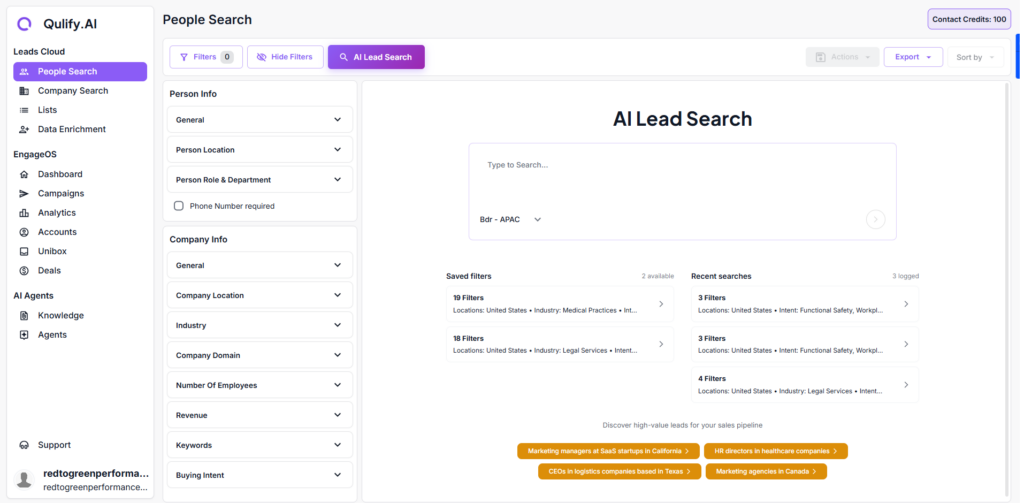
Head over to People Search. From here you have two options:
- Type in what you’re looking for using plain language, and let the BDR agent generate the right filters automatically.
- Use the filters on the left manually for more precise control.
Searching with AI #
The AI approach is the fastest way to build a list. Simply describe who you want to reach — for example:
- “Founders and CEOs at B2B SaaS companies in Australia with 10 to 200 employees”
The agent interprets this and generates matching filters automatically.
Searching with Manual Filters #
If you want more control over your list, set filters manually. Available filters include:
- Job title
- Industry
- Company size
- Location
- Revenue
- Intent Signals
- etc
| 💡 Tip: The tighter your search, the better the quality of your list. Get as specific as possible. |
Reviewing & Saving Results #
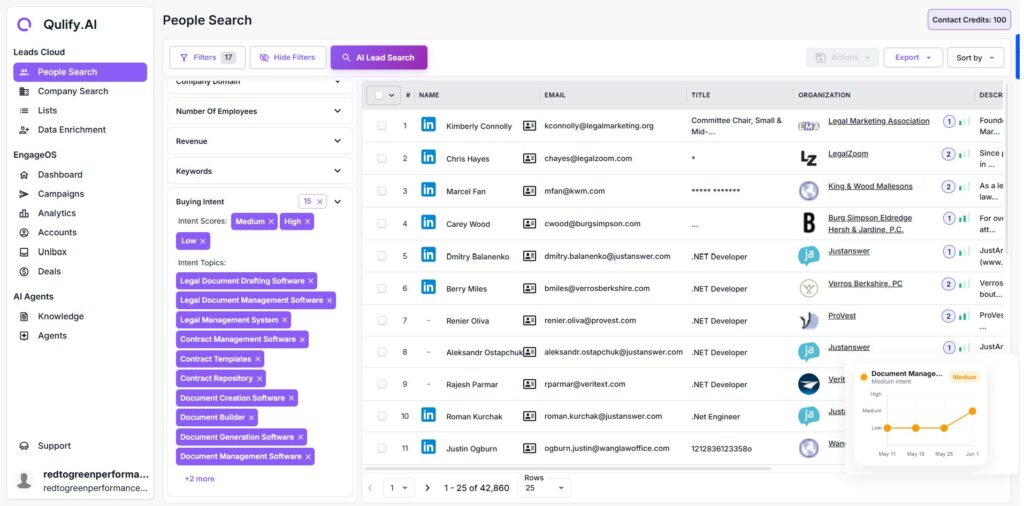
- Set your filters on the left and click Search.
- Results appear on the right, browse through them and confirm the profiles match what you’re after.
- Once you’re happy with the results, click Save to List.
- Create a new list and give it a specific, descriptive name (for example, “AU SaaS Founders May 2026”).
| 💡 Tip: Specific list names make it much easier to manage and reuse lists later, especially once you have several running at once. |
What’s Next #
With a saved list of leads, you’re ready to move on to Running Campaigns to set up your outreach sequence and launch.


